Dependent Product Options

Got options with options?
SearchFit’s mission from our early days has never wavered: we aim to bring enterprise level shopping cart functionality to businesses…
More InfoDynamic Product Filters

Improve website usability and convenience.
Visitors to an eCommerce website are statistically more likely to conclude their visit with a purchase if they utilize product…
More InfoRelated Products

Create a more informative product page with related products.
Related products can provide numerous opportunities for a merchant to increase average order value, increase average items per order, and…
More InfoIntelligent Product Groups
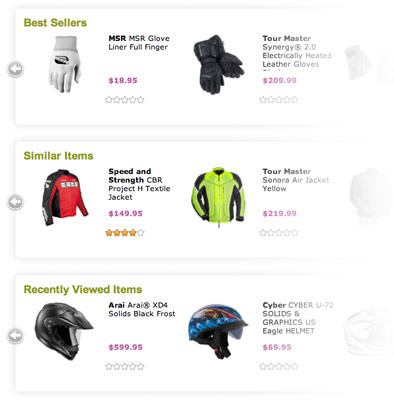
Automatically add a product display to your site which contains only products that match a specific set of criteria.
For example, add a product display to your home page that automatically lists your best selling products. SearchFit includes the following Intelligent Product Group types: Customers Also Bought Recently, View Products Best Selling, Products By Quantity, Best Selling Products By Revenue, Best Selling Products By Profit, Most Recent Products, Top Ranked Products/Best Customer Rating, Most Ranked Products, Most Profitable Products, Products on Sale.
Advanced Image Galleries
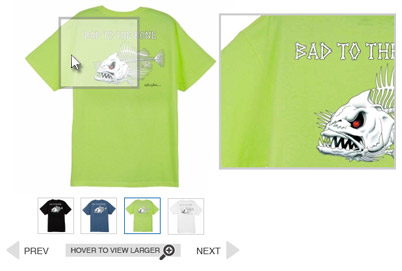
Image galleries help increase your website conversion rate in different ways.
Having a great image display makes customers excited about your products and can give them the emotional push they need to make a buying decision. Image galleries also help customers explore your product. Customers can see the products from different angles and in different situations, giving them a more realistic perception of the product. This helps give customers the details about the product they need in order to make a buying decision.
Automatic Inventory Updates
Set your cart to fetch inventory automatically.
The Automatic Inventory Update feature allows you to set the cart to fetch an inventory file from an ftp location and set the frequency of its fetches. This eliminates manually updating inventory and creates more time for you and your team to service your customers.
Product Links
SearchFit offers a customization feature to include a canonical link tag on your Product Links
When you want to have a product in multiple places on your website because they are, for example, in multiple categories, you can use Product Links to make a copy of that product page to be used in another spot on your site. This is very useful for stat tracking, so that you can see which categories are performing best. This can be seen as duplicate content by search engines and lower your ranking, so SearchFit offers a customization feature to include a canonical link tag on your Product Links, so that they will not harm your search engine rankings.
Product Pages
With SearchFit’s powerful and easy to use interface, configuring your product pages has never been easier.
SearchFit has a wide range of customization options that allow you to set up your product pages for maximum benefit. Product pages are the lifeblood of an online store, and with SearchFit you will be able to set them up exactly how you need them in order to reach your goals!
Digital Products
SearchFit offers a wide range of features to enable you to be successful selling digital products.
Digital products can be great to sell on your site, letting you avoid having to ship thing and cutting down the amount of warehouse space you need, but they can also be tricky to deliver to customers in a way that is easy and painless for them. With SearchFit, you don’t need to worry about that, as our digital products features are designed to make sure you can be successful!